Field Guide / Feature Brief

SCP Docs

Find a report, then actually get back to it

SCP Docs brings archive entry points, search, reader controls, and personal reading state into one native iOS app. It is designed for the full archive loop: find the next file, save what matters, organize it in Library, and resume without rebuilding your trail.

Home Archive routes Library Search Stats Share cards
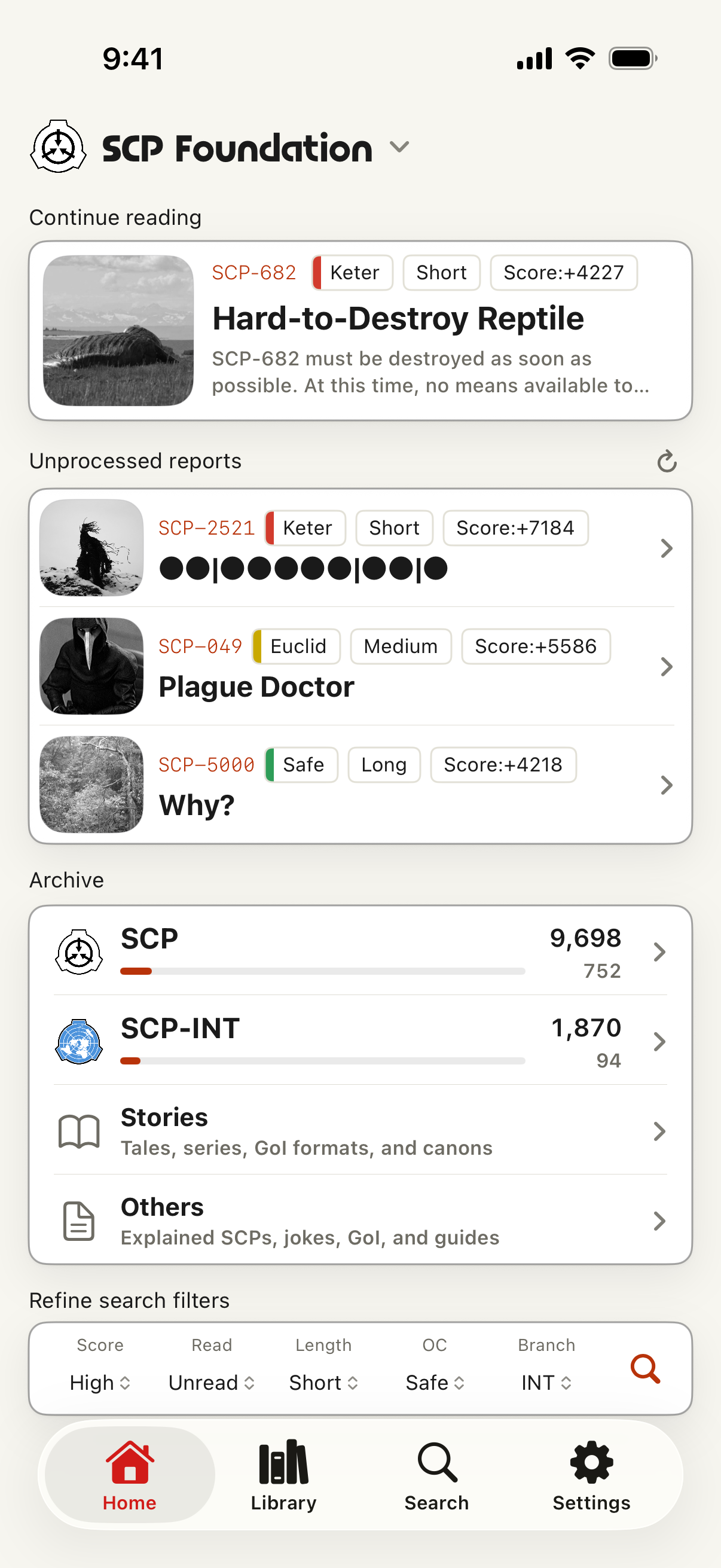
English SCP Docs home screen showing continue reading, archive routes, and search filters

Screens that match the workflow

Home screen with branch selection, continue reading, archive routes, and quick filters
Home: branch, archive routes, and continue reading
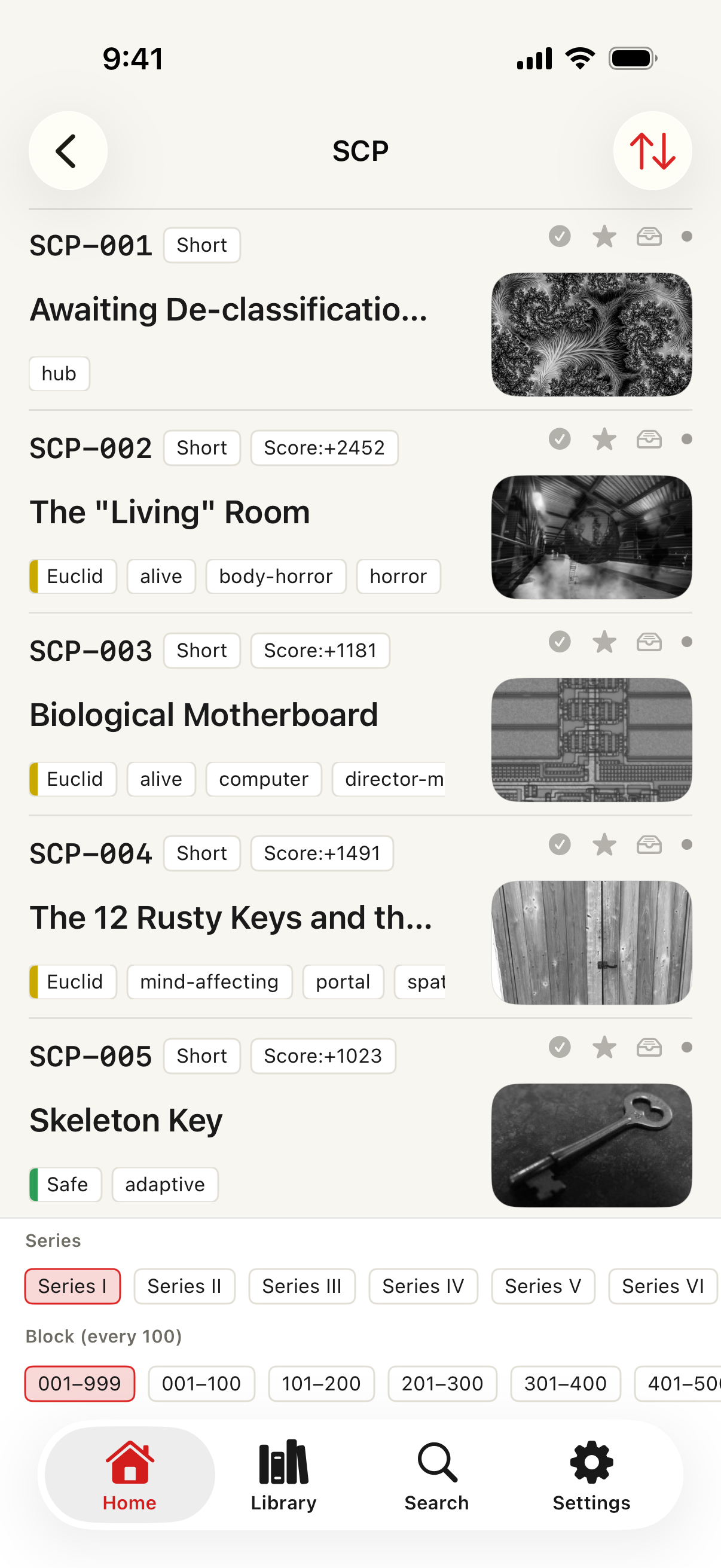
SCP catalog list with article rows, series filters, and block filters
Catalog: browse articles before you know the number
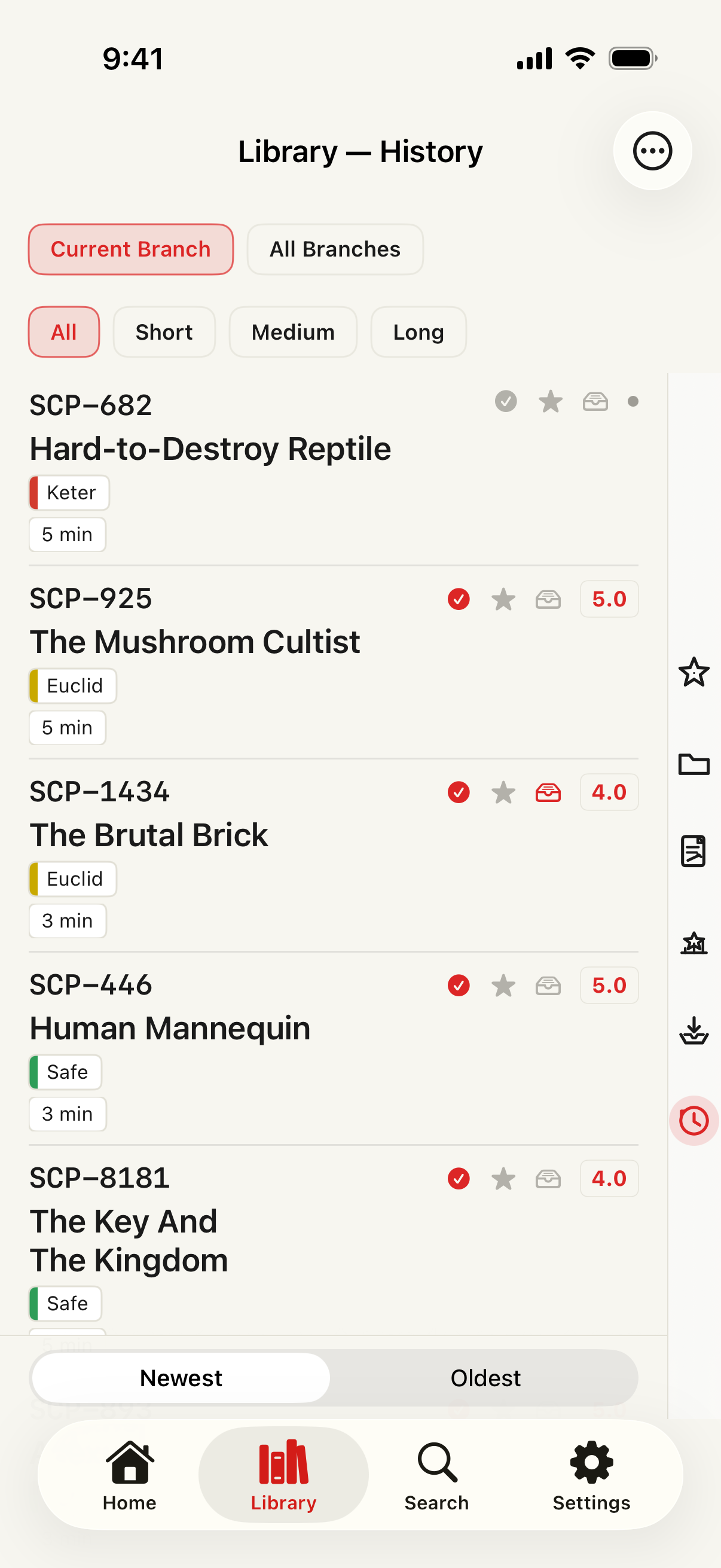
Library history screen with read status, ratings, bookmarks, quick actions, and sort controls
Library: history, ratings, bookmarks, and saved state
Search screen with number, keyword, tag, site, type, Object Class, and advanced filters
Search: number, keyword, tag, and advanced filters

From archive lists to a personal reading shelf

Use Home as the archive map

Pick a branch
Choose English, Japanese, French, Russian, Korean, Spanish, or Polish. Home, search, lists, article links, and the app language follow that branch context.
Start from directories
Browse SCP reports, Tales, Canons, Canon series, GoI, Joke SCPs, SCP-EX, collections, recent articles, guides, and related lists without needing the exact article number first. Every catalog adds an "Unread only" filter, sort by number or rating, and a "Top rated" lens for each branch's highest-rated articles.
Jump when you know the target
Use free number and title search for quick access. Recent searches reappear as one-tap chips. Premium advanced search adds tags, Object Class, document text, memos, read status, official score, length, and saved conditions.

Turn browsing into Library state

Save the article
Bookmark it, mark it read-later, rate it, or keep a memo so the report is no longer just another page in the archive.
Resume from context
History, continue-reading, read status, ratings, memos, and scroll position help you return to the same file or series after a break. Articles now reopen automatically at your last scroll position, and Read Later items are saved for offline reading automatically.
Organize for longer projects
Premium expands save limits, adds bookmark folders, supports memo editing, can sync Library state through your own iCloud Drive, and can store eligible articles for offline reading.

What to use when

I want to browse without a specific article in mind
Start on Home, choose the branch, then open Archive routes such as SCP, SCP-INT, Stories, or Others. The catalog screen lets you move by series and block, with article rows showing titles, Object Class, tags, scores, and thumbnail previews where available.
I know the number, title, tag, or Object Class
Use Search. Number and title lookup are available for normal use, while Premium advanced filters help narrow by document group, branch, tags, official score, length, Object Class, reading state, and memos.
I found something I want to keep
Save it from the reader or Library as a bookmark, read-later item, rating, memo, or folder entry. Those signals make the article visible later from Library instead of relying on memory or browser history.
I stopped halfway through a series
Use Continue reading, Library history, stored scroll position, and read status to return to the same report or track what has already been handled.

Core features

English, Japanese, French, Russian, Korean, Spanish, and Polish archives

Switching branches changes Home, search, lists, article destinations, and app language so each archive has its own reading context.

Cleaner archive routes before you know the number

Move through SCP reports, Tales, Canons, Canon series, GoI, Joke SCPs, SCP-EX, collections, recent articles, guides, and related lists from organized entry points. The Library index is organized into four sections: article feeds, canons & collections, ratings & discovery, and guides & reference.

Unread filters and a Top rated lens

Every catalog adds an "Unread only" filter and sort by number or official rating. A new "Top rated" lens gathers each branch's highest-rated articles in one place.

Fast free search, deeper Premium filters

Open by SCP number, search titles, and use shortcuts for tags and Object Classes. Recent searches reappear as one-tap chips. Premium adds documents, memos, reading status, official score, length, and saved searches.

A focused article view

Typography controls, calmer themes, improved dark mode, scroll-to-top, offline snapshots, and closer rendering for specially formatted source pages.

A personal shelf for the archive

History, read status, ratings, bookmarks, read-later, scroll position, memos, folders, and resume-reading data stay organized on your device. Articles reopen automatically at your last scroll position, and Read Later items are saved for offline reading automatically.

Share as cards

Turn an article or hand-picked list into a styled card for X and other social apps, with templates and optional comments.

Stats, speech, and offline reading

Reading stats, text-to-speech that now follows each article's own language instead of the app language, memo editing, expanded save limits, ad removal, and offline storage support longer reading sessions.

iCloud-backed personal organization

When available, reading state, memos, saved searches, and bookmark folders sync through your own iCloud Drive. Saved searches can notify you about new matches on device.

Free vs Premium

CapabilityFreePremium
Number & title search
Archive directories & catalog browsing
History, bookmarks, read-later, ratings
Reader themes, typography & dark mode
Adsshownhidden
Save limitsstandardexpanded
Advanced search filters
Memo editing
Offline snapshots
Reading stats
Text-to-speech
Saved searches & new-match alerts
Bookmark folders & iCloud sync

Premium is provided as an auto-renewing subscription through the App Store. When available, a rewarded ad can grant temporary Premium access without a subscription.

SCP Docs is not an official SCP Foundation or Wikidot app. Source pages, author credits, and license notices on each source site remain authoritative.