▮ ITEM #: SCP-DOCS-APP · OBJECT CLASS: READER
Secure.
Contain.
Read.
SCP Docs is an unofficial fan-made iOS reader for SCP Wiki and branch-site articles. It turns public source pages into a native archive workspace: browse branch directories, search by number or title, save important files, organize them in your Library, and return to the exact reports you were reading.
- Unofficial fan app
- Free + Premium
- Rated 13+
- No account needed
Field screens
Screens that match the workflow
Reading workspace
Browse the archive, then keep your place
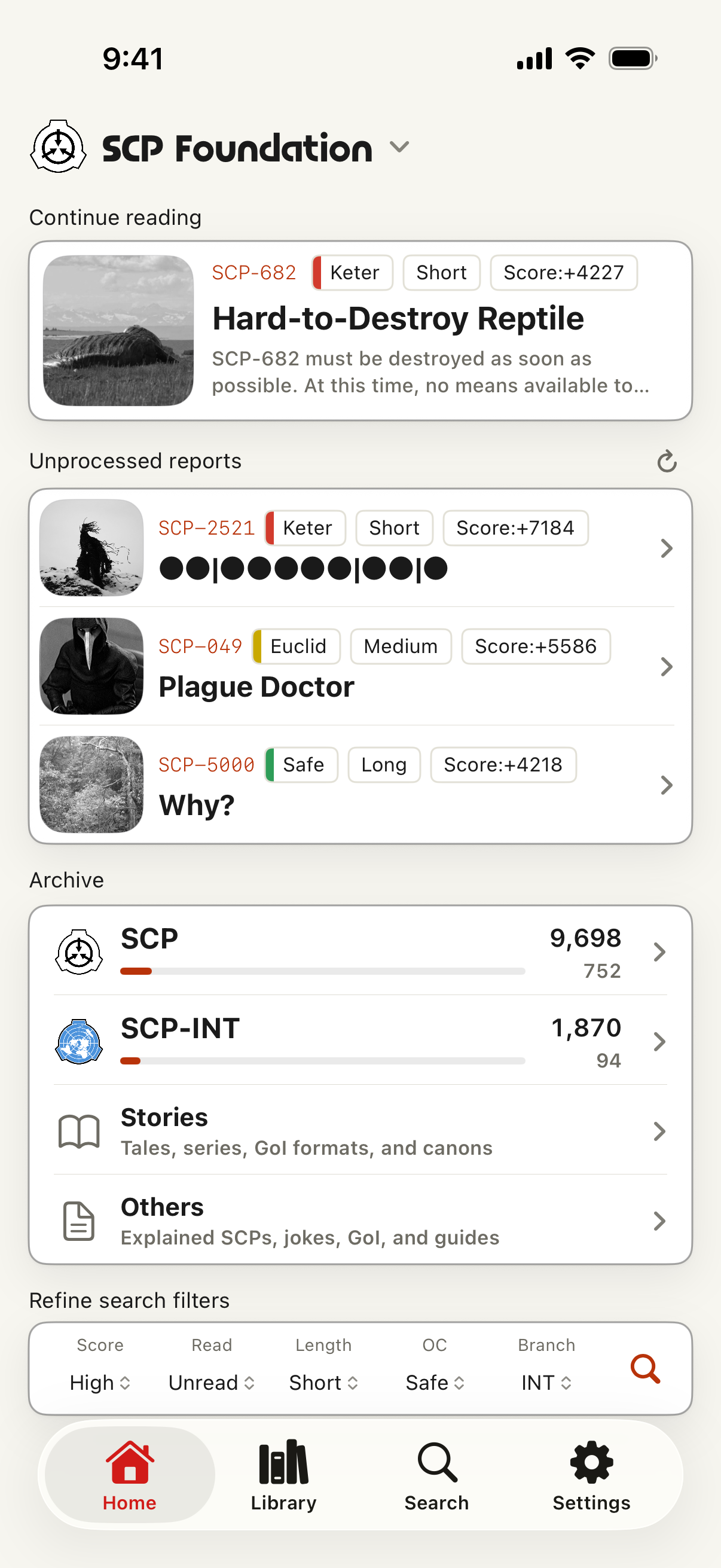
The app is organized around Home, Library, Search, and Settings. Home acts as the archive entry point, with continue-reading, quick search presets, random discovery, and directory routes for SCP reports, Tales, Canons, Canon series, Groups of Interest, guides, and related collections.
Library turns browsing into a personal shelf. History, read status, ratings, bookmarks, read-later items, scroll position, memos, folders, and resume-reading data stay tied to the articles you open, so your path through the archive remains visible on device. Articles reopen automatically at your last scroll position, and Read Later items are stored for offline reading automatically.
Content scope
Seven branches, one archive workflow
SCP Docs supports the English main SCP Foundation archive plus the Japanese, French, Russian, Korean, Spanish, and Polish branches. Switching branches changes Home, search, in-app lists, article destinations, and the app UI language. SCP International and translated archive entry points are listed where catalog data is available.
- Archive lists — Start from branch-aware directories for SCP articles, Tales, Canons, Canon series, GoI, Joke SCPs, SCP-EX, collections, recent articles, and related routes.
- Catalogs — Every catalog adds an "Unread only" filter, sort by number or official rating, and a "Top rated" lens gathering each branch's highest-rated articles.
- Search — Jump directly by number or title for free; Premium adds advanced filters across documents, tags, Object Class, memos, reading status, official score, length, and saved searches.
- Library — Save articles as bookmarks or read-later items, rate them, add memos, group favorites into folders, and resume from stored scroll positions.
- Reader — Cleaner typography, themes, scroll tools, better dark mode, and more faithful rendering for specially formatted source pages.
Premium
Tools for deeper reading
- Reading stats
- Reading time, catalog coverage, frequently read Object Classes and tags, rating trends, memo insights, backlog status, and logs by day, month, and year.
- Saved searches
- Save search conditions and receive on-device notifications when new matching catalog entries appear.
- Bookmark folders
- Organize saved articles into folders that can sync through your own iCloud Drive, along with memos and saved searches.
- Listen and save
- Text-to-speech reads article text aloud in the article's own language rather than the app language, and offline snapshots keep eligible saved articles available without a connection.
- Share as cards
- Turn an article or selected list into a styled share card for X and other social apps, with templates and optional comments.
- Ads and limits
- Premium hides ads, expands save limits, unlocks memo editing, and enables advanced search. A rewarded ad can grant temporary Premium access when available.
Requirements
System requirements
- OS — iOS 17 or later.
- Network — required for catalog refresh, online article viewing, source-site content, ads, purchase checks, and app links.
- Accounts — no SCP Foundation or Wikidot account is required for reading in the app.
Deployment
Open the archive
SCP Docs is an unofficial fan application. Source articles, author credits, copyright notices, and licensing terms remain governed by the source sites. SCP-related works are commonly published under Creative Commons BY-SA 3.0, but each source page is authoritative.